Tag Archives: Technology/Internet

Google Closure Compiler doesn’t work?!

What are these strange java errors?

No, it works but maybe the problem is you current Java version. The Google Closure Compiler requires 1.6 and most commonly you’re runing on 1.5 therefore it produces errors. It was my problem when I tried to run the application. At that moment it produced these lines of errors:

java -jar compiler.jar --help

Exception in thread “main” java.lang.UnsupportedClassVersionError: Bad version number in .class file
at java.lang.ClassLoader.defineClass1(Native Method)
at java.lang.ClassLoader.defineClass(ClassLoader.java:676)
at java.security.SecureClassLoader.defineClass(SecureClassLoader.java:124)
at java.net.URLClassLoader.defineClass(URLClassLoader.java:260)
at java.net.URLClassLoader.access$100(URLClassLoader.java:56)
at java.net.URLClassLoader$1.run(URLClassLoader.java:195)
at java.security.AccessController.doPrivileged(Native Method)
at java.net.URLClassLoader.findClass(URLClassLoader.java:188)
at java.lang.ClassLoader.loadClass(ClassLoader.java:317)
at sun.misc.Launcher$AppClassLoader.loadClass(Launcher.java:280)
at java.lang.ClassLoader.loadClass(ClassLoader.java:252)
at java.lang.ClassLoader.loadClassInternal(ClassLoader.java:375)

Just update or switch your current Java version to 1.6 and everything will be fine!
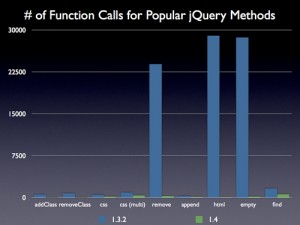
Performance of jQuery 1.4

Since the release of jQuery 1.4 most of the blogosphere is full of articles about it, what’s new and how to upgrade from 1.3.2. Actually one of the most common words in these posts, according to Steve Souders, the guru of performance in the web, is … guess what – performance!

What’s interesting to me is one graphic Steve’s placing in hist post:

Actually I’m working on a project with the use of jQuery and in my practice these functions Steve mentioned – html(),remove(),empty() are the most used indeed.

That’s really very good for those who use jQuery.

What if your site doesn’t use all of the CSS selectors?

Why my site doesn’t use all of the CSS however?

Well someone can ask how you can have CSS that contains selectors that aren’t used on the site. There are two reasons to happen and most of the cases both of them are true.

The first reason is that not all of the pages in a site need all of the selectors. Imagine large web based application with lines of CSS and one of the sites’ pages is the “about” page where you’ve only the header, the footer and some text. That’s my favorite example! In fact you don’t need to load the whole CSS file just to apply only few selectors for this page. In most of the cases this is the reason to have unused selectors.

The second reason is that during the development process most of the code become old and therefore unused. You start by writing some CSS selectors which after changing the requirements, and the layout are no longer used. But the fear to ruine the layout because some other page can break after the removal of some selectors make the CSS to grow and fill with unused code.

Now you can overcome this problem by simply using a software (JavaScript) that helps you determine which selectors are never used. Check out this brilliant solution called helium.

Google Closure Compiler?

Yes, it’s a question! After reading about jQuery version 1.4 I saw something that seemed to be pretty interesting to me. jQuery is now using Google Closure Compiler to minify and compile it’s source. The result was smaller output file.

Now I’m using YUI Compressor for my project and when I decided to make an experiment with Googles’ software it was just because I’d like to gain loading savings. In the project I’m working on I use two famous JavaScript libraries: jQuery and OpenLayers, and the result was really good. The compiled code was smaller than the YUI compressed source and the savings where more than 50% for non-gzipped requests.

The problem is that the resulting code, even successfully compiled after what Google said, was producing errors on the site and wasn’t working correctly. That why I’m leaving the title as a question and I’ll continue my experiments with this approach until I get any good results.

Optimizing OpenLayers. Make it smaller and faster!

In breve OpenLayers is a open javascript library that gives you the power to integrate, work and develop map based web applications as is Google Maps.

The problem is that the library supports so many protocols, controls and tools that you probably never use in your application and because of this the size of the resulting, compressed javascript file is around 700K, which is too big for any javascript file at all. That makes your site slow and the user experience is really awful!

The solution is to cut that functionality that you don’t use, which is not so easy. You’ve to be careful doing this, just because you can crash you application by removing something that seems to be useless but in fact isn’t.

I’ve used this technique and managed to make the resulting javascript file up to 400K. And this is really simple – just add the files your application don’t need to the .cfg file you use for compression. Usually this fils is in the /build directory of OpenLayers.

Even more – I’ve seen some other developers managing to reduce the size up to 300K and that’s more than twice which is really very good result.

The other thing I’d like to do with that library is to explore with care the code inside and to optimize anything I can. There are too many style reflows in some classes and that’s what’s visible on the first look. I suppose there are much more things to optimized in it.

I’ll start doing my research and optimization and I’ll let you know what happens in numbers!