Tag Archives: jquery

Performance of jQuery 1.4

Since the release of jQuery 1.4 most of the blogosphere is full of articles about it, what’s new and how to upgrade from 1.3.2. Actually one of the most common words in these posts, according to Steve Souders, the guru of performance in the web, is … guess what – performance!

What’s interesting to me is one graphic Steve’s placing in hist post:
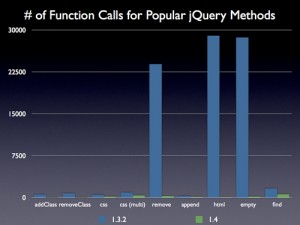
Actually I’m working on a project with the use of jQuery and in my practice these functions Steve mentioned – html(),remove(),empty() are the most used indeed.

That’s really very good for those who use jQuery.

Google Closure Compiler?

Yes, it’s a question! After reading about jQuery version 1.4 I saw something that seemed to be pretty interesting to me. jQuery is now using Google Closure Compiler to minify and compile it’s source. The result was smaller output file.

Now I’m using YUI Compressor for my project and when I decided to make an experiment with Googles’ software it was just because I’d like to gain loading savings. In the project I’m working on I use two famous JavaScript libraries: jQuery and OpenLayers, and the result was really good. The compiled code was smaller than the YUI compressed source and the savings where more than 50% for non-gzipped requests.

The problem is that the resulting code, even successfully compiled after what Google said, was producing errors on the site and wasn’t working correctly. That why I’m leaving the title as a question and I’ll continue my experiments with this approach until I get any good results.

jQuery vs. pure JavaScript

The question is: should I use always jQuery in some large jQuery project? Imagine you’re developing a large scale web application where the JavaScript part of it is supported by jQuery. In my case that was the reality. In fact in every, even very big, project there are “pages” where you don’t need much of JavaScript. Such pages can be the “about”, “info” or whatever static page there is.

Well the question is, should I again include the hole jQuery if I need only to toggle the visiblity on a DIV element? Let’s assume you’ve very long text, cutted in the beggining with the “more” link somewhere after the intro. That’s very common, isn’t it? So by clicking on the “more” you toggle the visibility of the rest of the text. Well of course it’s absurt if I include the entire library just to make this.

The right answer by me is to use pure JavaScript, something like that:

document.getElementId('id').style.display = 'block'

That will do the same job without to block the “fast” in other way page!

jQuery live() vs bind() performance

1. What is event delegation in JavaScript?

To start with some example let’s assume that there is one DIV element with 100 A tags inside. If you assign event to every A tag that as you may know slowes down your browser. That’s a problem because sometimes that can happen, even with more than one hundred A tags. Imagine you’ve a map with one thousand markers, which are A tags. Attaching events slowes down the browser, because every of these A tags bubbles the event that has been fired. And that makes your CPU to make thousands of calculations. Of course you can avoid this problem with a simple technique. Just attach one single event on the container DIV element. Thus you can check if some child of the DIV element has been the target of the event. This makes the browser to breath. Continue reading jQuery live() vs bind() performance